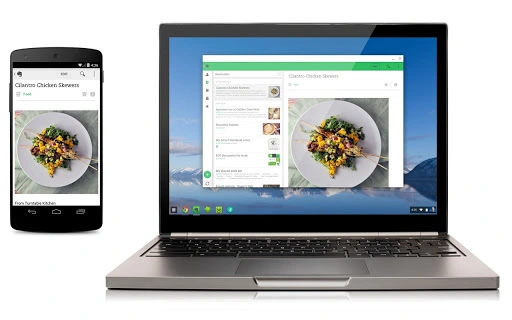

Run Android Apps on Chrome OS
The App Runtime for Chrome (Beta) enables users to run select Android applications directly on Chrome OS devices. Designed for Chromebook users, this tool bridges the gap between mobile and desktop environments, offering access to popular Android apps without requiring a separate Android device. It supports seamless integration with Chrome OS, allowing users to manage app installations, updates, and settings through familiar Chrome OS interfaces.
The runtime is particularly useful for professionals and students who rely on mobile-first productivity tools, such as note-taking apps, communication platforms, and educational software. It also benefits casual users seeking entertainment apps, including games and media players. The tool is automatically installed when the first Android app is downloaded, ensuring a streamlined setup process.
For developers and testers, it provides a testing environment for Android apps on Chrome OS. The developer, Google, has a strong track record in platform integration, which adds credibility to this project. While the runtime is currently in beta, it represents a significant step toward unified app ecosystems across devices.
Key Features & Capabilities
- Android App Integration – Enables the execution of selected Android applications within the Chrome OS environment, allowing users to access mobile apps on their Chromebooks without switching devices.
- Automatic Installation – The runtime is installed automatically when a user downloads their first Android app, minimizing setup complexity and ensuring a frictionless onboarding experience.
- Seamless System Integration – Apps run with native-like performance and are accessible through the Chrome OS launcher and taskbar, maintaining consistency with the desktop user experience.
- Centralized Management – Users can manage all Android apps through the Chrome OS settings, including updates, permissions, and uninstallation, using a unified interface.
- Testing and Development Support – Provides a platform for developers to test Android apps on Chrome OS, helping ensure compatibility and performance across different device types.
The runtime allows professionals to use productivity apps like Google Keep or Notion on their Chromebooks, while students can access educational tools such as Khan Academy or Duolingo. Casual users benefit from playing games or streaming content via apps like YouTube or Netflix. The integration ensures that app behavior aligns with Chrome OS standards, reducing user confusion. The automatic installation process ensures that users do not need to manually configure the runtime, enhancing accessibility for non-technical users.
User Interface, Workflow & Performance
The user interface of the App Runtime for Chrome (Beta) is tightly integrated with the Chrome OS environment, leveraging the existing system design language. Navigation is handled through standard Chrome OS menus and the app launcher, ensuring consistency with other desktop applications. Users interact with Android apps as they would on a mobile device, with touch-friendly layouts and responsive controls. The workflow is streamlined: once an Android app is installed, it appears in the app list and can be launched with a single click. Updates are managed automatically through the Chrome OS update system, reducing maintenance overhead.
Performance observations are based on general software behavior patterns. The runtime is designed to operate efficiently within the Chrome OS ecosystem, with minimal impact on system resources. The developer did not specify resource usage details. Stability is expected to be high, given Google’s experience with system-level integrations. The runtime runs in the background when Android apps are active, and it shuts down when no apps are in use, helping preserve battery life and system performance.
Compatibility & System Requirements
The App Runtime for Chrome (Beta) is designed exclusively for Chrome OS devices. It is compatible with all Chromebooks that support Android app installation, which typically includes models released from 2017 onward with sufficient hardware capabilities. The installation size is 25 MB, indicating a lightweight footprint. The software version is 1.0.0, and it is available as part of the Chrome OS update cycle. The developer did not specify additional hardware requirements such as CPU, RAM, or storage beyond the minimum system requirements for Android app support on Chrome OS.
Compatibility information was partially provided. Users should ensure their Chromebook model supports Android apps before relying on this runtime. The runtime is not available for Windows, Mac, or other operating systems. It is automatically installed when the first Android app is downloaded, eliminating the need for manual setup. For users upgrading their Chrome OS version, the runtime is expected to be updated alongside the system.
Pros and Cons
Pros
- Seamless integration with Chrome OS for a unified user experience
- Automatic installation when downloading Android apps – no manual setup required
- Lightweight footprint at just 25 MB
- Supports a wide range of Android apps on Chrome OS devices
- Centralized management through Chrome OS settings
Cons
- Currently limited to Chrome OS – not available on Windows or Mac
- Only supports Android apps that are compatible with Chrome OS
- Runtime is in beta – may include unresolved issues
- Dependent on Chrome OS updates for new features and stability improvements
- Requires removal of all Android apps to uninstall the runtime
FAQ Section
Is the App Runtime for Chrome available for Windows or Mac?
The App Runtime for Chrome (Beta) is designed exclusively for Chrome OS and is not available for Windows or Mac operating systems.
How do I remove the App Runtime for Chrome?
To remove the runtime, you must first uninstall all Android apps from your Chromebook. Once no Android apps remain, the runtime can be uninstalled through the Chrome OS settings.
Is the App Runtime for Chrome secure?
As a Google-developed component integrated into Chrome OS, the runtime benefits from the platform’s built-in security features. It runs within sandboxed environments to protect system integrity.
Does the App Runtime require regular updates?
Yes, the runtime is updated automatically as part of the Chrome OS update process. Users do not need to manually update it.
Can I use the App Runtime offline?
Yes, once Android apps are installed, they can be used offline. The runtime itself does not require an internet connection to function after initial setup.
Final Thoughts + CTA
The App Runtime for Chrome (Beta) represents a meaningful advancement in cross-platform app accessibility, especially for Chromebook users. By enabling the execution of Android apps directly on Chrome OS, it expands the functionality of Chromebooks beyond traditional web-based workflows. The automatic installation, lightweight design, and seamless integration make it a practical solution for students, professionals, and casual users alike.
While still in beta and limited to Chrome OS, its potential for enhancing productivity and entertainment is clear. Google’s strong development track record adds confidence in its long-term viability. For anyone using a Chromebook and wanting access to Android apps, this runtime is a must-have feature.
Download App Runtime for Chrome now







